
How to share encrypted files without sending a password
The usual way to send a private file goes like this: zip it with a password, email the zip, then text the password. It works — until you notice that the password is now sitting in a chat history, possibly reused, possibly forwarded. Anyone who sees both messages can open the file.
There's a better way, and it's how secure messengers work: public-key encryption.
The idea in one paragraph
Everyone has two keys: a public key they can give to anyone, and a private key that never leaves their device. You encrypt a file with someone's public key; only their private key can open it. Nothing secret ever travels between you — so there's no password to intercept, reuse or forget.
The one step people skip: checking the key
Public keys solve the password problem but create a new question: is this really Priya's key, or one an attacker swapped in? That's why public keys come with a short fingerprint. Read it to each other on a call, or compare it in person, once. After that you know the key is genuine.
Doing it with Clavis
In Clavis, your public key is called your Clavis ID. Every vault has one, and it's free.
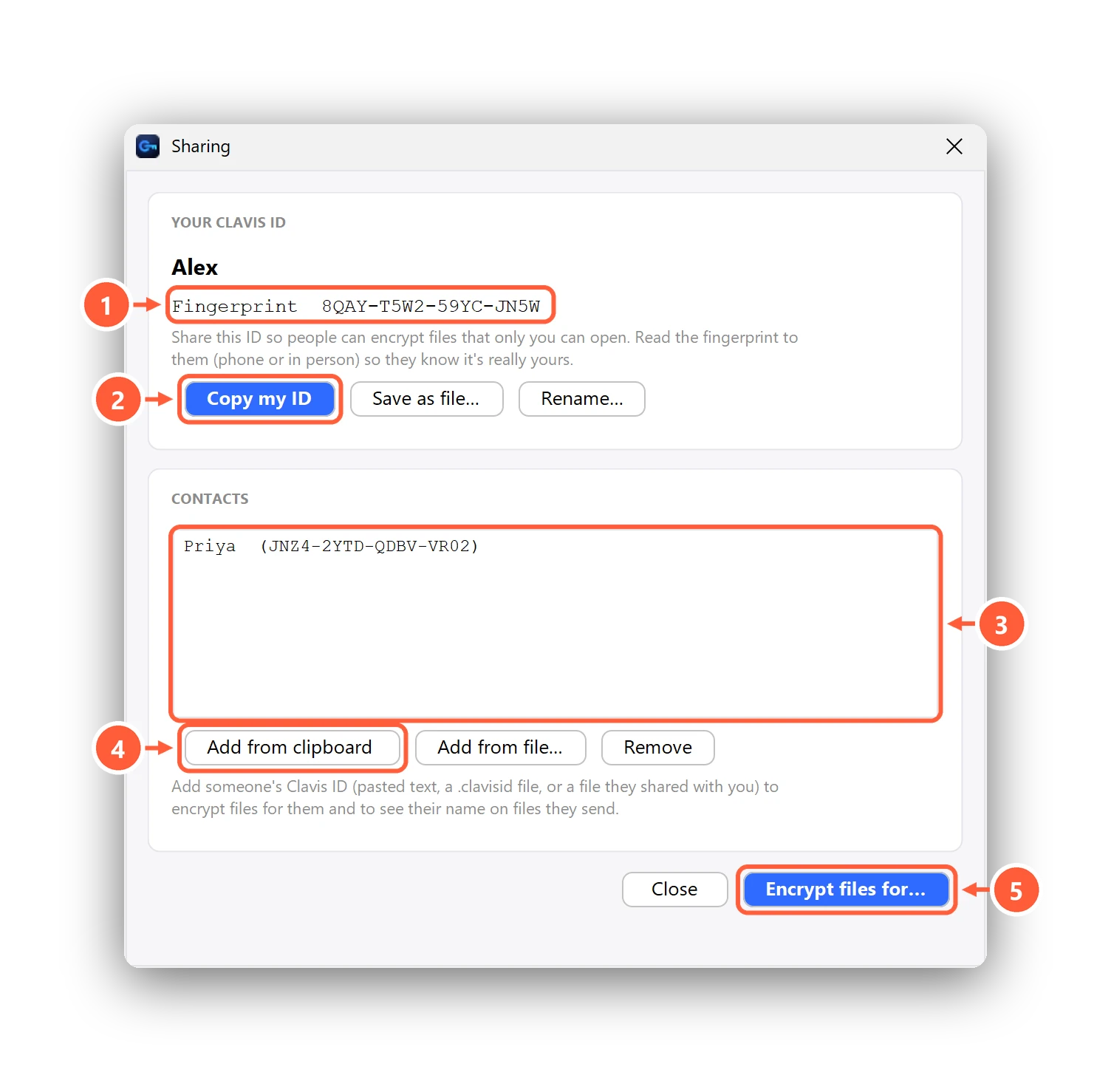
- Swap IDs. Press Copy my ID and send it to the other person; they send you theirs (or the
.clavisidfile). - Add the contact and compare fingerprints — over the phone or face to face.
- Encrypt for them: right-click the file → Clavis → Encrypt for someone… → pick the contact. You can pick several people at once.
- Send the .enc file any way you like: email, WhatsApp, a USB stick, a shared drive. Without their vault it's just noise.
When they open it, Clavis also shows who sent it: every shared file is signed, and a file that was altered on the way won't open. Opening shared files is free; encrypting files for others is part of Clavis Premium. The sharing help article walks through every screen.
What's happening underneath
For the curious: Clavis encrypts the file with a random AES-256-GCM key, then wraps that key for each recipient using a hybrid of X25519 and ML-KEM-768 — the post-quantum standard NIST published in 2024 — and signs the whole file with Ed25519. An attacker would have to break both the classical and the post-quantum scheme. The Security page has the full design.
When a password is still fine
If the other person doesn't use Clavis and won't install anything, a password-protected 7-Zip archive (AES-256) is a reasonable fallback. Just send the password through a different channel than the file — a phone call, not the same email thread — and make it long.