
Create your vault and master password
A vault is the key ring behind your encrypted files: your password, your recovery key and (if you use them) your notes and contacts. The first time you start Clavis it asks you to create one, called default.
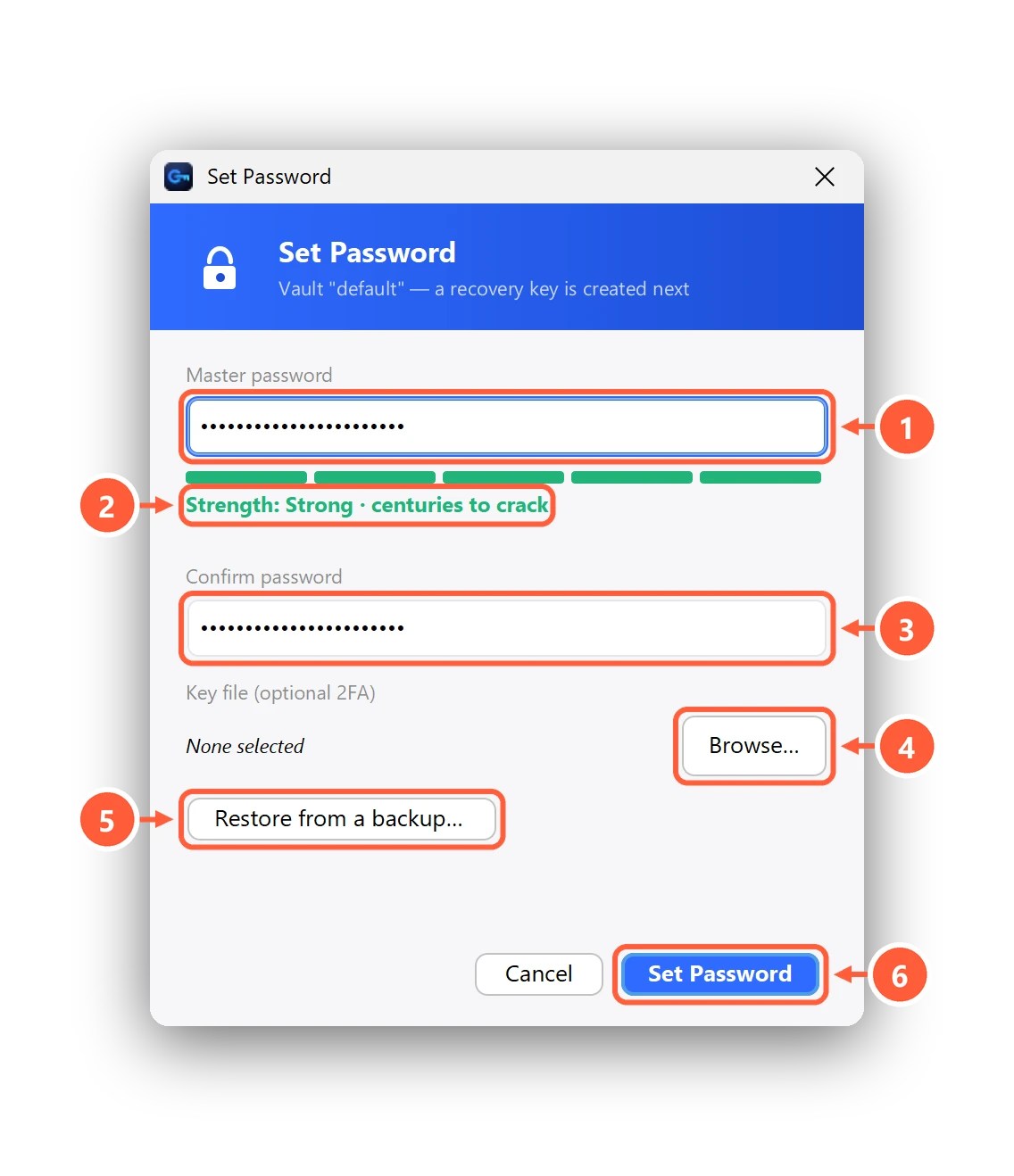
- Choose a strong master password
- Clavis shows how long it would take to crack
- Type it again to confirm
- Optional: add a key file as a second factor (Pro)
- New PC? Restore a vault backup instead
- Create the vault
Choosing a good password
As you type, Clavis estimates how long an attacker who had your encrypted files would need to guess the password, and warns about
common words, keyboard patterns, dates and swapped letters like p@ssw0rd. A few unusual words strung together —
Maple-Harbor-Lantern-62 — beats a short, complicated one. If you pick a weak password anyway, Clavis asks you to confirm.
Optional: a key file
With Clavis Pro you can also choose a key file: then the vault needs the password and that file.
Setting up a new PC?
If you made a vault backup on your old computer, press Restore from a backup… instead of creating a new password. Restoring is free.
Can't find what you need? All help articles · Email us